Today, many college students struggle to find the right guidance for learning DevOps and cloud technologies. I've come across countless questions on Reddit from beginners looking for the best learning resources and a clear path to grow in this field.
In this article, I'll share a complete DevOps roadmap - from beginner to advanced level - along with valuable learning resources to help you on your journey. If you're just getting started, spend 5–10 minutes reading this article and you'll walk away with a clear direction for learning DevOps effectively.
Beginner Mistakes While Starting to Learn DevOps
Here's one of the most common mistakes beginners make.
They search for a "DevOps roadmap" on Google and start following it immediately. The roadmap usually includes technologies like Docker, AWS, Kubernetes, Terraform, CI/CD, and more. Excited to learn, they begin watching tutorials and completing courses for each tool.
At first, this seems like the right approach. After all, these tools are widely used in the industry and appear on almost every DevOps roadmap. However, what many beginners don't realize is that the learning order matters.
Most DevOps roadmaps only show what to learn, not how to learn it. As a result, beginners often jump straight into tools without understanding the fundamentals that those tools are built upon.
For example, someone may start learning Docker before understanding basic Linux concepts. Another person might dive into Kubernetes without having a clear understanding of networking, servers, or application deployment. This often leads to confusion and frustration because the concepts don't connect.
Here's the problem
Kubernetes manages containers across multiple servers. If you've never worked with a Linux server, it's difficult to understand what pods, deployments, and services are actually solving.
Terraform is used to create and manage cloud infrastructure through code. But if you've never manually created a server, configured networking, or deployed an application, it's hard to appreciate the problems Terraform is designed to solve.
AWS certifications teach you about services and their capabilities, but they don't always teach the practical foundations behind them. You can learn what a load balancer does, but without understanding how web applications, servers, and networks work together, the concept remains abstract.
In the end, many beginners collect knowledge about tools without understanding the underlying systems.
It's like memorizing the names of every tool in a carpenter's workshop without ever learning how wood is cut, shaped, and assembled.
And that's why so many people feel stuck even after completing multiple courses and certifications. The issue isn't a lack of effort—it's learning the tools before learning the fundamentals.
Why Learning DevOps Feels So Overwhelming
One of the biggest challenges beginners face when learning DevOps is they can see n number of tools and technologies involved. Linux, Git, Docker, Kubernetes, Cloud, CI/CD, Terraform, Monitoring—the list seems endless.
As a beginner, it's easy to feel like you need to learn everything at once. This often leads to information overload and confusion.
The good news is that you don't need to master every tool immediately. DevOps is a journey, not a race. Focus on learning the fundamentals first, understand the purpose behind each technology, and build your skills step by step.
Remember, every experienced DevOps engineer once started exactly where you are today.
What Most Beginners Actually Do
Most beginners start their DevOps journey by searching for a roadmap and jumping straight into popular tools like Docker, Kubernetes, Terraform, and AWS. They spend weeks watching tutorials and collecting certificates, hoping it will make them job-ready.
However, many skip the fundamentals such as Linux, networking, servers, and application deployment. As a result, they know how to use a tool but don't fully understand why it exists or what problem it solves.
This approach often leads to confusion and makes advanced topics much harder to understand. Instead of chasing every new tool, focus on building a strong foundation first. Once the basics are clear, learning DevOps becomes much easier and more enjoyable.
The Foundation Nobody Talks About
When people talk about learning DevOps, they usually focus on tools like Docker, Kubernetes, Terraform, and cloud platforms. What often gets overlooked are the fundamentals that make all these tools work.
Before any cloud service. Before any container. Before any pipeline.
There are four things that every DevOps engineer uses every single day. Not occasionally. Every day.
| What | Why |
|---|---|
| Linux | Every server you will ever manage runs Linux |
| Networking | All infrastructure is just connected networks |
| Git / GitLab | All automation starts from code in a repository |
| HTTP and DNS | Every application you deploy speaks these |
The strongest DevOps engineers aren't necessarily the ones who know the most tools—they're the ones with the strongest foundations. By investing time in the fundamentals first, you'll find that learning Docker, Kubernetes, CI/CD, and cloud technologies becomes much easier later on.
Getting Started with Linux
This is where almost every DevOps and Cloud Engineer begins their journey.
Behind the scenes, Linux powers most of the modern technology we use today. The majority of cloud servers run on Linux, Docker containers are built on Linux-based systems, and most Kubernetes clusters rely on Linux nodes.
If you want to understand how infrastructure works, Linux is a skill you simply can't skip.
The good news is that you don't need to become a Linux expert overnight. Your goal as a beginner should be to get comfortable working with a Linux server through the command line. Learn how to navigate files, manage processes, edit configurations, and troubleshoot basic issues.
Once you're comfortable with Linux, many other DevOps concepts will start making much more sense. It becomes the foundation on which you'll build the rest of your DevOps and cloud skills.
Start with the filesystem.
Linux keeps everything in a folder structure. You need to know where things live.
/etcis where configuration files live. When you want to change how nginx behaves, you go here./var/logis where logs live. When something breaks, you come here first./optis where you manually install software./homeis where user files live.
Learn permissions.
Every file has an owner and a set of rules about who can read, write, or run it. This matters because when your application can't read its own config file, it's usually a permissions problem.
ls -la /etc/nginx/nginx.conf# -rw-r--r-- 1 root root 2611 Jun 1 nginx.conf# rw- → the owner (root) can read and write# r-- → the group can only read# r-- → everyone else can only read
Understand processes and services.
Every running program is a process. Long-running programs like web servers are managed as services.
# Check if nginx is runningsudo systemctl status nginx# Start, stop, restartsudo systemctl start nginxsudo systemctl restart nginx# See what's using port 80sudo ss -tlnp | grep :80# Follow logs in real timejournalctl -u nginx -f
Always check logs first.
When something breaks, the first thing you do is look at logs. This is true for Linux, for containers, for Kubernetes — everything.
# Last 100 lines of system logsjournalctl -n 100# Nginx error logtail -f /var/log/nginx/error.log
Where to learn:
- linuxjourney.com — interactive, clear, well-organised
- OverTheWire: Bandit — learn Linux by solving puzzles, actually fun
Exploring the World of Networking
Every application you deploy lives on a network. When things break, the problem is very often a networking problem.
A security group blocking the wrong port. A DNS record pointing at the wrong server. A firewall rule that was never added. A timeout that's too short.
You don't need to be a network engineer. But you need to understand how traffic flows.
IP addresses and subnets.
Every machine on a network has an IP address. In cloud environments, you define private IP ranges for your own networks.
10.0.0.0/16 → a whole private network with 65,000 addresses10.0.1.0/24 → a smaller slice with 256 addresses
This matters when you're creating cloud networks, firewall rules, or Kubernetes network policies.
DNS.
DNS turns human-readable names into IP addresses.
When someone visits your website, here's what actually happens:
- Their browser asks: what is the IP address for this domain?
- A DNS server looks it up and says: it's
10.201.35.13 - The browser connects to that IP address
When your SSL certificate breaks, it's often a DNS issue. When your service can't reach another service inside Kubernetes, it's often a DNS issue. Understanding this saves hours of debugging.
Ports.
A server can run many services at the same time. Ports tell traffic where to go.
| Port | What it's for |
|---|---|
| 22 | SSH (connecting to a server) |
| 80 | HTTP (web traffic, no encryption) |
| 443 | HTTPS (web traffic, encrypted) |
| 5432 | PostgreSQL database |
| 6379 | Redis |
When you get a "connection refused" error, the first thing to check is: is the right port open?
HTTP.
Every web application talks HTTP. You need to understand the request-response cycle and what status codes mean.
200 → everything worked301 → this page moved permanently (redirect)401 → you need to log in403 → you're logged in but not allowed404 → page doesn't exist500 → the server crashed502 → the server got no response from your app (your app crashed)503 → the server is overloaded or down
When a user reports an error, knowing what a 502 vs a 503 means tells you immediately where to look.
Where to learn:
- NetworkChuck on YouTube — genuinely entertaining, great for learning for beginners
- Julia Evans' blog and zines — some of the clearest networking explanations on the internet
Mastering Version Control with Git
Everything in DevOps starts in a Git repository.
Infrastructure code. Application code. Pipeline definitions. Kubernetes configuration. Terraform files. All of it lives in Git.
If you don't understand Git, you cannot work in this field. There is no workaround.
The basics you need:
git clone <url> # get a copy of a repositorygit status # what has changed?git add . # stage your changesgit commit -m "message" # save a snapshot with a descriptiongit push # send your changes to the remotegit pull # get the latest changes from the remote
Branching.
Branches let you work on something without touching the main code until it's ready.
git checkout -b feature/add-monitoring # create a new branch# make your changesgit push origin feature/add-monitoring # push to the remote# open a pull request
Pull requests.
A pull request is how you propose merging your branch into main. It's where code review happens. In every professional team, no code goes to production without going through a pull request first.
Understanding pull requests means understanding:
- How to write a description that explains what you changed and why
- How to respond to review comments
- How to resolve conflicts when two people changed the same file
Why this matters for DevOps specifically:
CI/CD pipelines are triggered by Git events. A push to main triggers a deployment. A pull request triggers tests. Git is not a separate skill — it is the foundation that all automation is built on.
Where to learn:
- Learn Git Branching — interactive visual tool, makes branching make sense
- Atlassian Git Tutorials — practical and well-explained docs
Learn Docker Before Kubernetes
Kubernetes is a tool for running containers across many machines. If you don't understand containers first, Kubernetes is completely incomprehensible.
A container is a Linux process running in an isolated environment. It has its own filesystem, its own network, its own process table. But it shares the host machine's operating system kernel.
This is different from a virtual machine, which runs a completely separate operating system. Containers are lighter, faster, and cheaper.
Images and containers.
An image is a template. A container is a running instance of that template.
Think of it like this: an image is a recipe. A container is the meal you cooked from that recipe. You can cook the same recipe a hundred times and get the same result every time.
FROM ubuntu:22.04RUN apt-get update && apt-get install -y nginxCOPY ./config/nginx.conf /etc/nginx/nginx.confEXPOSE 80CMD ["nginx", "-g", "daemon off;"]
docker build -t my-nginx . # build an imagedocker run -d -p 8080:80 my-nginx # run a container from itdocker ps # see what's runningdocker logs <container-id> # check its logsdocker exec -it <container-id> bash # go inside the container
Volumes.
Containers are temporary. When a container stops, any files it created are gone.
Volumes solve this by storing data outside the container. Your database files, your uploaded images — they live in a volume, not inside the container itself.
Why Kubernetes comes after.
Kubernetes solves the problem of running containers across many machines. It handles scheduling, scaling, and self-healing.
But that problem doesn't exist until you understand what containers are, why they're used, and what happens when a single machine isn't enough.
Learn Docker first. Build a real application. Run it with Docker Compose. Then Kubernetes will make complete sense, because you'll understand the problem it exists to solve.
Where to learn:
- Docker official documentation — actually very good to learn
Cloud Services: Understanding the Fundamentals
There are many cloud service providers available today, including AWS, Azure, Google Cloud (GCP), IBM Cloud, and DigitalOcean. Platforms like AWS, Azure, and GCP offer hundreds of services ranging from virtual machines and storage accounts to databases, networking, and AI services.
Because of the vast number of services available, many beginners feel they need to learn everything before they can become proficient in Cloud or DevOps. However, that's not true.
The reality is that most cloud services are built around a few core concepts. Once you understand these fundamentals, learning new cloud services becomes much easier. Let's start with the four key building blocks that power almost every cloud platform.
| Concept | What it means | AWS name | Azure name |
|---|---|---|---|
| Compute | A server that runs your code | EC2 | Virtual Machine |
| Storage | A place to keep data permanently | S3, EBS | Blob Storage |
| Networking | The private network your servers live in | VPC | Virtual Network |
| Security | Who is allowed to do what | IAM | Entra ID |
Once you understand these four things, you can work in any cloud provider. An AWS security group and an Azure NSG are both just firewall rules. Different names, same idea.
The right way to learn cloud computing:
Many beginners start their cloud journey by focusing on certifications. While certifications can be valuable, it's important to gain hands-on experience first.
Create a free account on platforms like AWS or Azure and start exploring the core services. Begin with the fundamentals, such as networking, compute, and storage services. Reading documentation is helpful, but you'll learn much faster by actually using the services yourself.
Start by creating a virtual machine (VM) or server. Host a simple website or application. Create a storage bucket and upload files. Set up users, permissions, and access controls using IAM. Explore services like databases, networking, and storage to understand how they work together.
The goal is to get comfortable using the cloud through the management console before moving on to automation tools. Once you understand how resources are created and connected manually, learning Infrastructure as Code (Terraform), CI/CD, and cloud automation becomes much easier.
Where to learn:
- Stephane Maarek's Courses (Udemy) — one of the best beginner-friendly resources for learning AWS and cloud fundamentals
- KodeKloud — offers hands-on, lab-based learning that helps you build real-world cloud and DevOps skills through practical exercises
Terraform: Managing Infrastructure Through Code
Once you've gained hands-on experience creating and managing cloud resources manually, the next step is learning Terraform and Infrastructure as Code (IaC).
Terraform allows you to define your infrastructure using code instead of manually creating resources through a cloud provider's console. With a simple configuration file, you can automate the creation of virtual machines, storage accounts, networks, databases, and much more.
This approach makes infrastructure management faster, more consistent, and easier to scale. Here is one example of creating an AWS instance via Terraform:
resource "aws_instance" "web" {ami = "ami-0c55b159cbfafe1f0"instance_type = "t3.micro"tags = {Name = "web-server"}}
The above Terraform code creates an AWS instance with the name "web", an Amazon Machine Image ID, and instance type as t3.micro.
This looks powerful. But it only makes sense if you already know what an EC2 instance is, what an AMI is, what an instance type means.
Many beginners make the mistake of learning Terraform before understanding cloud infrastructure. They copy code from tutorials, but when something goes wrong, they struggle to troubleshoot because they don't fully understand what the code is creating.
That's why the best approach is simple:
First, build infrastructure manually. Then, automate it with Terraform.
When you understand the underlying cloud services, Infrastructure as Code becomes much easier to learn and use effectively.
Where to learn:
- HashiCorp Developer Tutorials — official docs and more
- Terraform Sandbox — interactive environments where you can experiment without installation or setup
Kubernetes: Running Applications at Scale
Many beginners rush to learn Kubernetes because it's one of the most popular technologies in the DevOps world. However, Kubernetes should come much later in your learning journey.
Before learning Kubernetes, you should be comfortable with Docker, Linux, networking, and deploying applications on cloud servers. These fundamentals will help you understand the problems Kubernetes was designed to solve.
Kubernetes is a powerful container orchestration platform that manages containerized applications across multiple servers. It handles tasks such as scheduling, scaling, self-healing, load balancing, and rolling deployments.
However, not every application needs Kubernetes. In fact, many small and early-stage applications run perfectly fine on a single server using Docker or Docker Compose.
The reason Kubernetes exists is to solve challenges that appear as applications grow. When you have multiple services, multiple environments, increasing traffic, and larger teams, managing everything manually becomes difficult. Kubernetes helps automate and simplify these operations.
As a beginner, focus on learning the fundamentals first. Once you understand containers, cloud infrastructure, and application deployment, Kubernetes will make much more sense and become significantly easier to learn.
When you're ready to learn Kubernetes, focus on:
- Pods, Deployments, Services — the core concepts
- ConfigMaps and Secrets — how configuration works
- Reading logs and understanding why a pod crashes
kubectl get podskubectl describe pod <pod-name>kubectl logs <pod-name>kubectl exec -it <pod-name> -- /bin/bash
Where to learn:
- KodeKloud — the best hands-on Kubernetes platform, highly recommended
- killer.sh — realistic practice environment for CKA exam
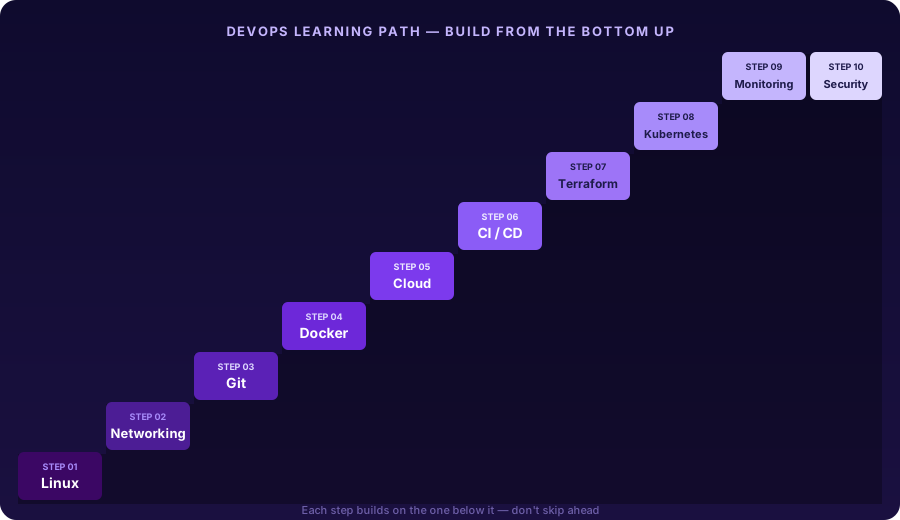
The Roadmap That Actually Makes Sense
Here's the step-by-step learning path that makes DevOps easier to understand:
Conclusion
If there's one thing I want you to take away from this article, it's this:
Tools change. Fundamentals don't.
The cloud services you're learning today may have different names five years from now. New DevOps tools will emerge, existing ones will evolve, and some will eventually disappear.
But the fundamentals remain the same.
Linux has been the backbone of modern infrastructure for decades. Networking concepts such as DNS, IP addressing, and HTTP continue to power the internet. Understanding how applications, servers, and processes communicate is knowledge that never goes out of style.
That's why your primary goal shouldn't be collecting certifications or learning every new tool that appears on a roadmap.
Certifications can be valuable and can help validate your knowledge, but they are not a substitute for real-world experience. I've met students with multiple certifications who struggled with practical tasks, and I've met others with no certifications who could confidently build, troubleshoot, and manage production level issues.
The engineers who stand out are not the ones who know the most tools. They're the ones who understand how things work behind the scenes. When you understand why something works, you can also understand why it breaks—and more importantly, how to fix it.
So don't just watch tutorials.
Build something. Deploy it. Break it. Troubleshoot it. Fix it. Repeat the process.
Every project you build teaches lessons that no certification exam or tutorial course can fully replicate.
Start with the fundamentals. Build your skills one step at a time. Be patient with the learning process.
The strongest DevOps engineers aren't built overnight—they're built on a solid foundation.
And that foundation starts with understanding the basics.