You have spent more than an hour setting up Docker Compose for your new project. It might be a three-tier application with Nginx, a Node.js API, and MySQL — or anything really. You run docker compose up, watch the logs scroll past, and see all three containers in the running state.
Docker Desktop confirms it. Everything is green.
You open the browser and hit the API endpoint. It fails.
You check the logs:
Error: connect ECONNREFUSED 127.0.0.1:3306
The database, API, and Nginx are all running. But the application is broken, and nothing in the error message tells you why.
This is what most beginners face while working on tasks like deploying a three-tier application via Docker Compose and making all containers communicate with each other.
In this article we will walk you through the entire thing — how to set up proper communication between containers, how to troubleshoot Docker networking issues, and how to prevent this error from ever happening again.

Let's Rebuild the Incident
Let's build a minimal e-commerce API called ShopWave. The communication architecture is simple:
Browser↓Nginx (port 80)↓Node.js API (port 3000)↓MySQL (port 3306)
This API exposes a single endpoint: GET /products. It connects to MySQL on startup. If the connection fails, the process exits.
The project structure:
shopwave/├── docker-compose.yml├── api/│ ├── Dockerfile│ ├── package.json│ └── index.js├── nginx/│ └── nginx.conf└── mysql/└── init.sql
Setting Up the Three-Tier Application
Here is the initial setup exactly as many developers write it the first time.
docker-compose.yml
services:nginx:image: nginx:alpineports:- "80:80"volumes:- ./nginx/nginx.conf:/etc/nginx/conf.d/default.confdepends_on:- apiapi:build: ./apienvironment:DB_HOST: localhostDB_PORT: 3306DB_USER: rootDB_PASSWORD: shopwaveDB_NAME: shopwavedepends_on:- mysqlmysql:image: mysql:8.0environment:MYSQL_ROOT_PASSWORD: shopwaveMYSQL_DATABASE: shopwavevolumes:- ./mysql/init.sql:/docker-entrypoint-initdb.d/init.sql
api/index.js
const express = require('express');const mysql = require('mysql2');const app = express();const db = mysql.createConnection({host: process.env.DB_HOST,port: process.env.DB_PORT,user: process.env.DB_USER,password: process.env.DB_PASSWORD,database: process.env.DB_NAME,});db.connect((err) => {if (err) {console.error('[DB] Connection failed:', err.message);process.exit(1);}console.log('[DB] Connected to MySQL successfully');});app.get('/products', (req, res) => {db.query('SELECT * FROM products', (err, results) => {if (err) return res.status(500).json({ error: err.message });res.json(results);});});app.listen(3000, () => console.log('[API] Running on port 3000'));
mysql/init.sql
CREATE TABLE IF NOT EXISTS products (id INT AUTO_INCREMENT PRIMARY KEY,name VARCHAR(255) NOT NULL);INSERT INTO products (name) VALUES ('Laptop'), ('Mouse'), ('Keyboard');
nginx/nginx.conf
server {listen 80;location / {proxy_pass http://api:3000;}}
Now spin everything up:
docker compose up --build
The screenshot below shows all three containers in the running state.

Troubleshooting the Bug
Did you spot the bug in the compose file above?
Look at this section:
environment:DB_HOST: localhost
This is the bug. If you are new to Docker Compose you might feel it is correct and reasonable. You connect to MySQL using localhost all the time in local development. Why would Docker be any different?
Run this to see all container statuses:
docker ps

Everything looks healthy. Now hit the API:
curl http://localhost/products
You will get a 502 Bad Gateway from Nginx because the API request fails. Or the API container exits immediately. Check the logs:
docker logs shopwave-api
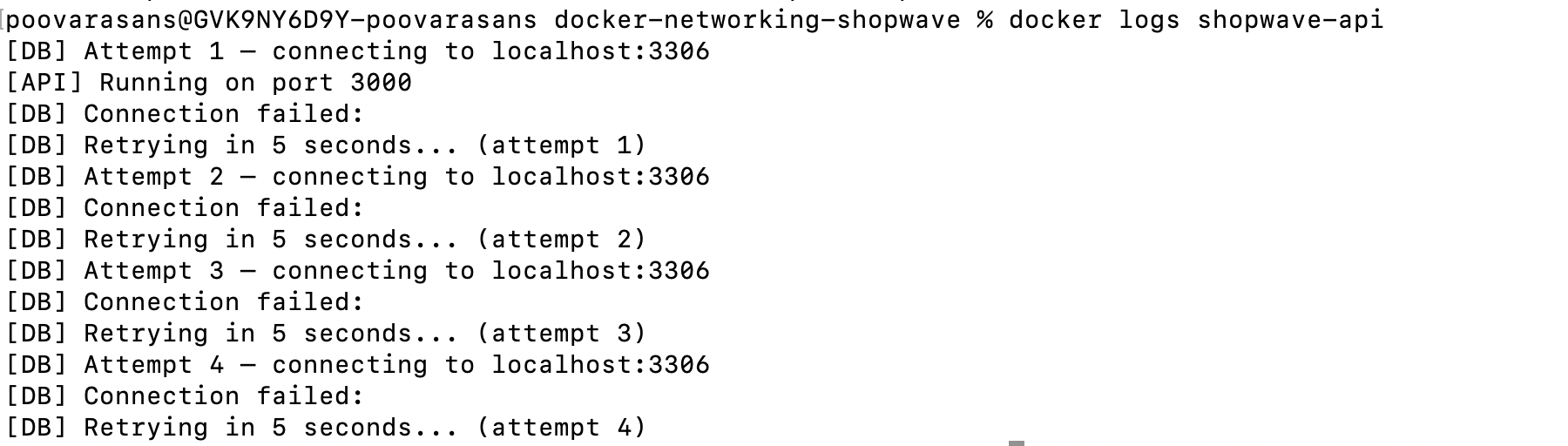
We know all container services are up and running. But the API cannot reach the database.
Why Was This Happening?
Before understanding the answer, let's go through the questions most engineers ask at this point.
"Is MySQL actually running?"
docker ps
Yes. The MySQL container is Up.
"Are the ports wrong?"
Review the docker-compose.yml. MySQL is not even exposing a host port — it doesn't need to, since the API is supposed to talk to it internally. The configuration looks correct.
"Is there a startup race condition?"
Possibly, but depends_on is set. And the error says ECONNREFUSED, not a timeout. Something is actively refusing the connection.
"Is it a credentials issue?"
No — ECONNREFUSED means the TCP connection was rejected before authentication even started.
"Is Docker networking broken?"
docker network ls

Docker created a network called shopwave_default. The containers are on it.
docker network inspect shopwave_default
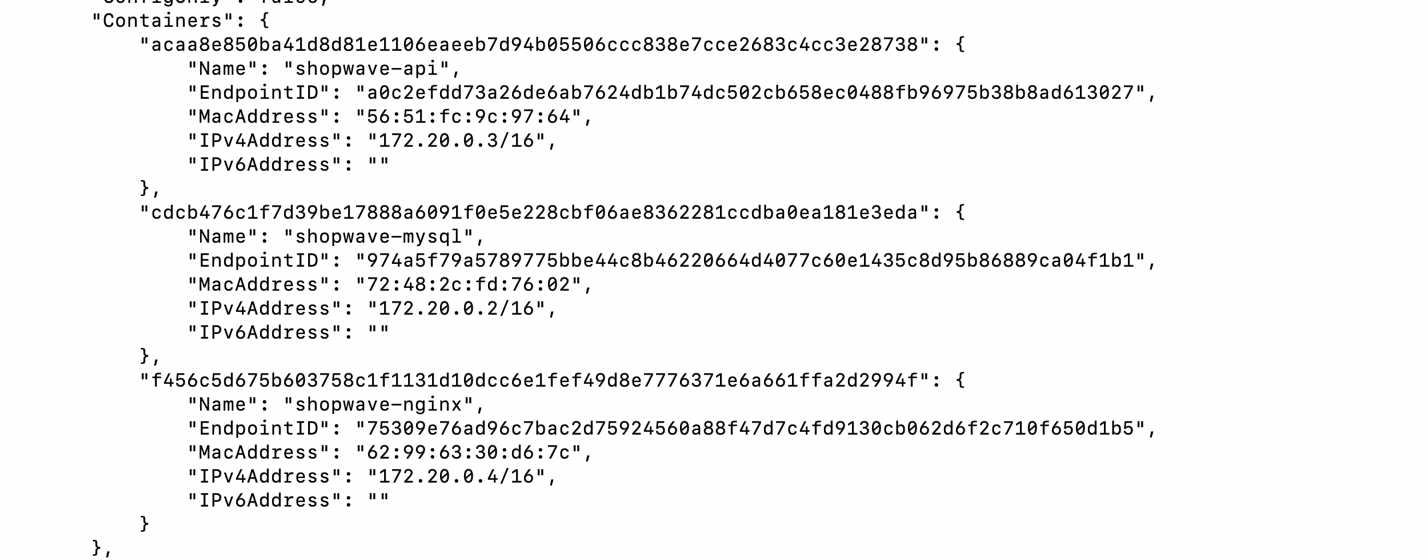
Every container has its own IP address on the network. Docker networking is functioning fine.
So what is wrong here?
The Hidden Truth About localhost Inside a Container
Here is what most Docker tutorials skip past without explaining it clearly.
Inside a container, localhost refers to that container — and only that container.
Not the host machine. Not Docker Desktop. Not other containers. Just itself.
This is because each container has its own isolated network namespace. Think of it as every container being its own tiny computer with its own loopback interface.
API Containerlocalhost → 127.0.0.1 → API Container itselfMySQL Containerlocalhost → 127.0.0.1 → MySQL Container itself
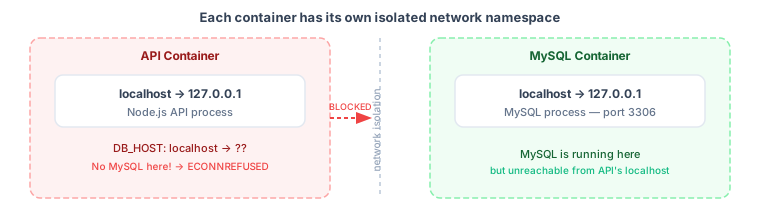
So when the API tries to connect to localhost:3306, it is looking for MySQL running inside the API container itself. There is no MySQL there. Port 3306 is not open. The OS-level TCP stack says: connection refused.
MySQL is running — just in a completely different network namespace that localhost inside the API container cannot see.
This is the mental model shift that makes everything else make sense.
localhost inside one container is completely invisible to every other container.How Docker DNS Actually Works
So how are containers supposed to talk to each other?
When you use Docker Compose, it automatically creates a bridge network and registers every service on that network using its service name as a DNS hostname.
The service name in your docker-compose.yml:
services:mysql: # ← this name becomes a DNS hostnameimage: mysql:8.0
Inside any container on the same Compose network, the hostname mysql resolves directly to the MySQL container's IP address.
Docker has a built-in DNS server running on every bridge network. When the API container looks up mysql, Docker DNS intercepts the query and returns the correct container IP — no manual configuration, no /etc/hosts editing, no static IPs.
API Containermysql → Docker DNS → 172.20.0.2 (MySQL Container IP)
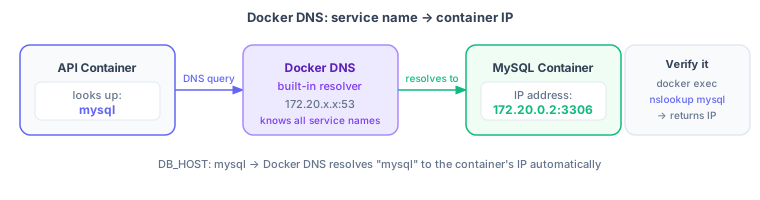
You can verify this from inside a running container:
docker exec -it shopwave-api shnslookup mysql
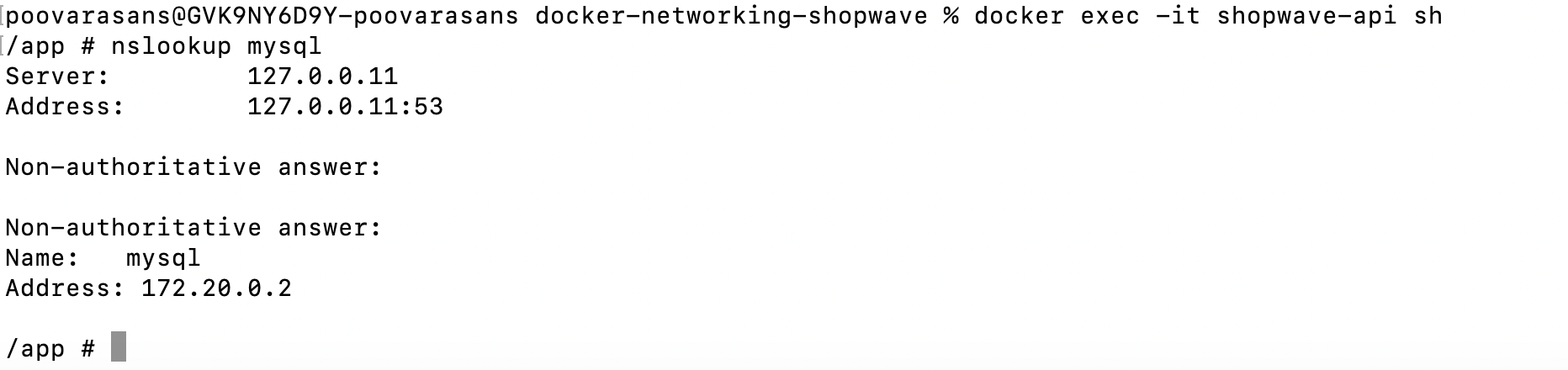
It resolves. The DNS is working. The network is working. The only problem was the code using localhost instead of mysql.
The One-Word Fix
One word change. Open docker-compose.yml and update the environment variable:
environment:DB_HOST: mysql # ← was: localhostDB_PORT: 3306DB_USER: rootDB_PASSWORD: shopwaveDB_NAME: shopwave
Restart the stack:
docker compose downdocker compose up --build

Now test it:
curl http://localhost/products
[{ "id": 1, "name": "Laptop" },{ "id": 2, "name": "Mouse" },{ "id": 3, "name": "Keyboard" }]
The API connects. The data comes back. Everything works.
How Docker Bridge Networking Works
Now that the fix is in place, let's understand what Docker is doing underneath.
When you run docker compose up, Docker creates a bridge network for your project:
shopwave_default (bridge network)├── nginx → 172.20.0.4├── api → 172.20.0.3└── mysql → 172.20.0.2
A bridge network is a virtual switch inside the Docker host. Containers connected to the same bridge can reach each other directly — using their container IP addresses, or using their service names via Docker DNS.
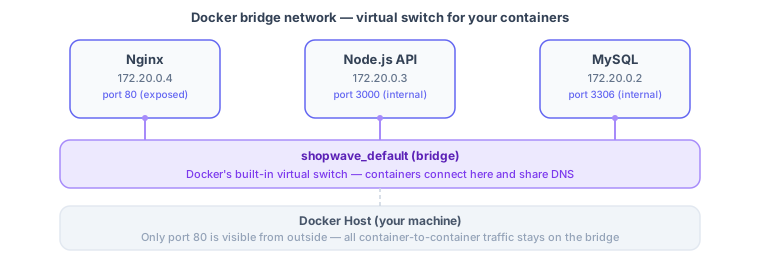
Containers on the same bridge network:
- Can reach each other by service name (
mysql,api,nginx) - Communicate on container ports, not host ports
- Are isolated from containers on other networks
Docker Port Mapping Misconception
When you write:
ports:- "80:80"
This means: map host port 80 to container port 80.
This is for external access — letting traffic from your laptop or the internet reach a container.
It has nothing to do with container-to-container communication.
When Nginx proxies to the API, it does not go through host port 3000. It goes directly through the bridge network to the API container's internal port 3000.
# Correctproxy_pass http://api:3000; ← container port, service name# Wrongproxy_pass http://localhost:3000; ← localhost inside nginx containerproxy_pass http://host.docker.internal:3000; ← unnecessary for same-network containers
If you publish a port (3000:3000) for a container and then use that host port from another container, you're routing traffic out of Docker, through the host machine, and back in — completely unnecessary when both containers are on the same bridge.
Common Docker Networking Mistakes
Mistake 1: Using localhost between containers
# WrongDB_HOST: localhost# CorrectDB_HOST: mysql # use the service name
localhost inside a container is that container's own loopback. It never reaches another container.
Mistake 2: Using host ports for internal communication
# Wrongproxy_pass http://localhost:3000;# Correctproxy_pass http://api:3000;
Service names work directly on bridge networks. Host ports are for external access only.
Mistake 3: Using the wrong container port
# WrongDB_PORT: 3360 # typo, wrong port# CorrectDB_PORT: 3306 # the port MySQL listens on inside its container
When communicating between containers, always use the container's internal port — not a remapped host port.
Mistake 4: Trusting container health as application health
docker ps → all containers Up
A container being Up means the process inside it started. It does not mean your application is correctly wired together. Misconfigured environment variables, wrong service names, or missing network connections can all cause application failures even when every container shows as healthy.
docker logs <container> when a service that looks healthy isn't responding. Container health and application health are two different things.Quick Command Reference
# View all Docker networksdocker network ls# Inspect a specific network — see which containers are on itdocker network inspect shopwave_default# Inspect a container's full networking configdocker inspect shopwave-api# Test DNS from inside a running containerdocker exec -it shopwave-api shnslookup mysqlping mysql# View live logs for a specific containerdocker logs -f shopwave-api# View running containersdocker ps# Create a custom network manuallydocker network create app-network# Connect an existing container to a networkdocker network connect app-network nginx# Disconnect a container from a networkdocker network disconnect app-network nginx
Summary
We fixed the issue with a one-word change — replacing localhost with mysql.
But the real lesson wasn't the fix.
Docker wasn't broken. The containers were healthy. The application failed because the code was built on an assumption that doesn't hold inside containers: that localhost is a shared address that everything on the same machine can see.
Inside a container, each process lives in its own isolated network namespace. localhost belongs only to that namespace — not to Docker, not to the host machine, and not to the other containers running beside it.
Once that assumption changes, Docker networking stops feeling like a black box. You stop asking:
"Why is Docker broken?"
and start asking the right question:
"Which hostname should this service be using to reach that service?"
More often than not, the answer is simply the service name.
And the next time your containers look healthy but your application doesn't, ask yourself one more question:
"Am I talking to the right service?"
That single question can save you hours of debugging.
Frequently Asked Questions
Why can't Docker containers communicate with each other?
Containers often fail to communicate because of incorrect hostnames, isolated network namespaces, or misunderstanding how Docker networks work. In many cases, using localhost instead of the service name is the root cause.
Does localhost refer to the host machine in Docker?
No. Inside a container, localhost refers only to that container itself. It does not point to the host machine or other containers.
How does Docker DNS work?
Docker automatically provides an internal DNS service that allows containers on the same network to discover each other using their service or container names. No configuration is required — it works out of the box with Docker Compose.
Should containers communicate using exposed host ports?
No. Containers on the same Docker network should use the container's internal port and service name. Host ports are primarily for external access from outside Docker.
What network does Docker Compose create by default?
Docker Compose automatically creates a bridge network named {project_name}_default for the application, allowing all services in the same Compose file to communicate with each other.
Notes
- The example in this walkthrough uses a three-container setup with Nginx, Node.js, and MySQL — but the same
localhostmistake and fix apply to any container stack: Python + Redis, Go + PostgreSQL, PHP + MariaDB. - Docker Compose automatically names its bridge network
{project_name}_default. You can define custom named networks in your Compose file for more control over which services can reach each other. - For Kubernetes, the equivalent concept is a Service — pods use the Service name as the DNS hostname to reach other pods, the same way containers use service names in Docker Compose.